# Print each element within species
print(species[0])
print(species[1])
print(species[2])
print(species[3])Loops
Python programming
Loops
Automation
This lesson introduces loops in Python, using for and while loops to iterate over sequences so you can automate repetitive tasks and apply the same code to many values.
Keywords
For loops, While loops, Iterate values
Approximate time: 50 minutes
Learning objectives
In this lesson, we will:
- Create
forloops to iterate over sequences of values - Implement
forloops within lists for list comprehension - Differentiate between
forandwhileloops
Overview of lesson
One of the most common problems that programming solves is the tedium of performing the same task/calculation repeatedly. Instead of writing the same code over and over again, we can use loops for automation. This is essential in a real analysis, where you might need to process hundreds of files or thousands of values consistently and without human error.
In this lesson, we will learn about two types of loops:
forloopswhileloops.
for loops
If we wanted to print out the names of all the species in our species list, we would be able to do so with the following code:
However, this is not very efficient! Especially if we had a long list of species or were unsure how many elements were in the list. We can instead use a for loop to accomplish the same task in a less repetitive manner by iterating over a collection.
To use a for loop, we need to specify an interval to loop over and a variable that will take the value of each element. We will then iterate through the sequence, assigning the variable to each element in the sequence in turn and then execute the code block for each element within the loop.
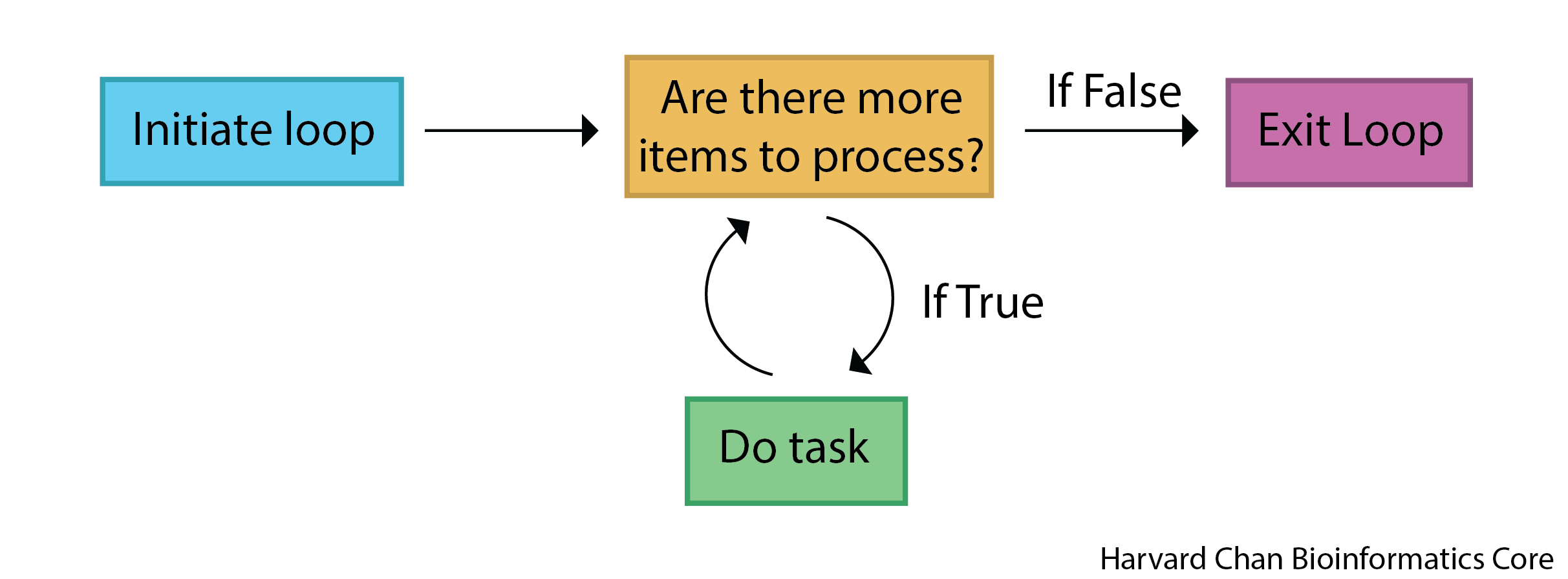
for loop process.
The general syntax of a for loop in Python is as follows:
# Example for loop syntax
# DO NOT RUN
for variable in sequence:
    # code to be executed
Creating a for loop
So if we wanted to print out the names of all the species in a list, we could use the following code:
# Iterate through species, assigning a new element to organism each time through
for organism in species:
    # Print the value of organism
    print(organism)
ecoli
human
corn
yeastWe now created a variable organism for the for loop. This is a variable that takes the value of each element in the species list as we iterate through it. So, in the first iteration of the loop, organism will be equal to "ecoli", in the second iteration, organism will be equal to "human", and so on.
We do not have to assign the list to a variable before we use it For example, we could iterate over a list of numbers without doing any assignment first and run calculations on those numbers as follows:
# Iterate through a list of integers, assigning a new element to number each time through
for number in [2, 3, 5]:
    # Print "number" followed by the number
    print("number", number)
    # Print "squared" followed by the square of the number
    print("squared", number ** 2)
number 2
squared 4
number 3
squared 9
number 5
squared 25Indentation matters
Like with if statements, the code within the for loop must be indented to be executed correctly. If we forget to indent the code, we will get an error. For example, the following print() statement will throw an error because it is not indented properly.
# Iterate through species, assigning a new element to organism each time through
for organism in species:
# Print out organism
# Error because line after for loop is not indented
print(organism)
Cell In[4], line 5 print(organism) ^ IndentationError: expected an indented block after 'for' statement on line 2
This is to once again emphasize that indentation is not just a matter of style in Python, but it is a fundamental part of the syntax. The indented code block is what gets executed as part of the loop, and if we forget to indent, Python does not know what to do.
TipExercise 1
- Create a
forloop that goes through a list that containsTrue,4andpretzel. For each element in that list have it print out the element followed by the datatype of the element.
Conditional statements within for loops
We can use what we learned about if statements in the lesson on conditional statements within our for loops to perform different actions based on certain conditions. This can be useful if we want to perform a specific action for certain elements in our list. For example, if we wanted to print out a different message for “human” compared to the other species, we could use the following code:
# Iterate through species, assigning a new element to organism each time through
for organism in species:
    # Check if organism is "human"
    if organism == "human":
        # If true, print out this message
        print("This is a human.")
    # Otherwise, do this
    else:
        # Print this message
        print("This is not a human.")
This is not a human.
This is a human.
This is not a human.
This is not a human.The range() function
A common use of for loops is to iterate over a sequence of numbers. We can use the range() function to generate a sequence of numbers that we can iterate over. The range() function takes three arguments:
start= number that the sequence will start fromstop= number that the sequence will stop at (but not include)step= number that the sequence will increment by. If you do not provide thestepargument, the default is 1
For example, if we wanted to iterate over the indices of species, we could use the range() function as follows:
# Iterate from 0 up to (not including) the length of species, assigning a new element to i each time through
for i in range(0, len(species)):
    # Print out i
    print(i)
0
1
2
3Complex for loop example
To show how for loops can be used for more complex tasks, let us first create a list of numbers. Then using a for loop, double the value of each number and keep a running total of those doubled values.
# Assign a list of integers to numbers
numbers = [2, 5, 8, 10]

# Initiate total to hold the running total
total = 0

# Iterate through numbers, assigning a new element to number each time through
for number in numbers:
    # Set doubled to equal twice the value of number
    doubled = number * 2
    # Add the doubled value to the previous total
    total = total + doubled

# Print off a message with the value of total
print("Total of doubled numbers:", total)
Total of doubled numbers: 50We can follow along with the logic through each iteration of the for loop to see how each of the variables are being updated at each step.
number, doubled, and total at each iteration of the loop.
| Index | number |
doubled |
total |
|---|---|---|---|
| 0 | 2 | 4 | 4 |
| 1 | 5 | 10 | 14 |
| 2 | 8 | 16 | 30 |
| 3 | 10 | 20 | 50 |
List comprehension
There is another “pythonic” way to work with loops and lists called list comprehension. In one step it allows you to update or create a new list by iterating over values. Perhaps we would like to subset our list or do something when an element that meets a certain condition in our list.
The syntax for list comprehension looks like:
# Example syntax for list comprehension
# DO NOT RUN
[ element_transformation for element in list]
Where:
element_transformationis what you want to happen to the elementforis initiating aforloopelementis what each element in thelistwill be calledin listis finishing out theforloop logic for the list that theforloop will iterate through
Let’s see an example of this if our goal was to square the numbers in a list:
# Square all elements in a list
[x * x for x in [1, 2, 3, 4, 5]]
[1, 4, 9, 16, 25]In this case, I am looping through the list [1, 2, 3, 4, 5], assigning each element to x and then carrying out the element_transformation part of multiplying x * x.
Alternatively, we could interrogate if some element of our list meets a conditional and print it out:
# Subset a list based on a conditional statement
[x for x in [1, 2, 3, 4, 5] if x == 2 or x == 4]
[2, 4]In this case we are looping through our list, [1, 2, 3, 4, 5], assigning each element to x. Then asking, is x equal to 2 or to 4. If that conditional returns as True, then we proceed to our element_transformation part and add x to an outputted list.
TipExercise 2
- Use list comprehension to sort through a list
["DNA", "RNA", "Protein"]and only retain the elements “DNA” or “RNA”.
while loops
Like for loops, while loops will execute a block of code many times over. This execution will continue so long as a certain condition evalutes to true. The while loop will stop executing once the condition becomes false.
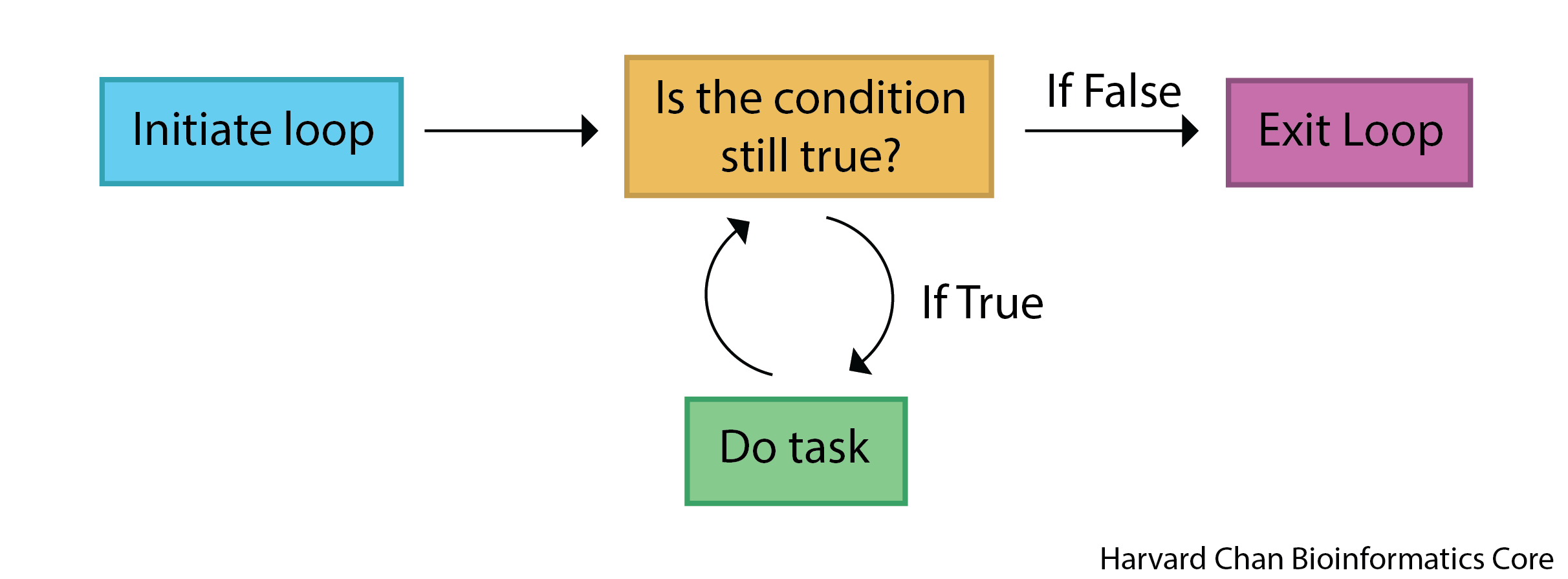
while loop process.
The general syntax of a while loop in Python is as follows:
# Example syntax for a while loop
# DO NOT RUN
while condition:
    # Code to execute
    ...
    # Update condition
    condition = update(condition)
The important distinction between while loops and for loops is that we must update our condition within the while loop in order to keep iterating properly through our loop. We do not have a built in tangible end to the while – unlike the for loop, where we stop iterating once we make it to the end of the sequence supplied in the statement.
Creating a while loop
while loops are typically used when we want to repeat a block of code an unknown number of times or when we want to repeat a block of code until a certain condition is met. For example, if we wanted to keep doubling a number until it is greater than 100, we could use a while loop as follows:
# This will hold the current value of the number and we will initialize it with 1
number = 1

# While number is less than or equal to 100
while number <= 100:
    # Print number
    print(number)
    # Update the number by doubling it and reassigning it to number
    number = number * 2

# Print the last number which triggered the while loop to exit
print("Last number:", number)
1
2
4
8
16
32
64
Last number: 128Why is our last number 128 and not 64?
This is because the condition number <= 100 is still true when number is equal to 64, so we execute the code block one more time, which doubles number to 128. After that, the condition number <= 100 is no longer true, so we exit the loop and print the last number.
Infinite loops
A very important thing to note about while loops is they can potentially run indefinitely if the condition never becomes false. Therefore, it is important to make sure that the condition will eventually become false, otherwise we will have an infinite loop. For example, the following code will run indefinitely because the condition i < 5 will always be True:
# Initialize a value for i as 0
i = 0

# While i is less than 5
# DO NOT RUN
# Note this will create an infinite loop, because the condition is never met
while i < 5:
    # Print i
    print(i)
Be sure to hit square stop button to stop the loop if you accidentally run an infinite loop!
TipExercise 3
- The Collatz conjecture is a big open question in mathematics. It states that any positive integer will form a sequence that ends with 1, if:
- On even numbers you halve the value
- On odd numbers you triple the value and add 1.
Let’s create a while loop to evaluates the number 17 to see each step in the path that it takes on its way to 1. With each iteration, we want to:
- Print the current integer being tested
- If it is an even integer, divide it in half
- If it is in an odd integer, multiply it by 3 and add 1
- Exit the
whileloop when it reaches 1
Hint: You will likely want to use a modulo operator, %. Modulo operators tell you the remainder following division. For example:
- 4 mod 2 = 0 because the remainder of 4 divided by 2 is 0
- 5 mod 2 = 1 because the remainder of 5 divided by 2 is 1
Reuse
CC-BY-4.0